


AI Receptionist · AI Voice Agent
The AI Receptionist for Hospitality
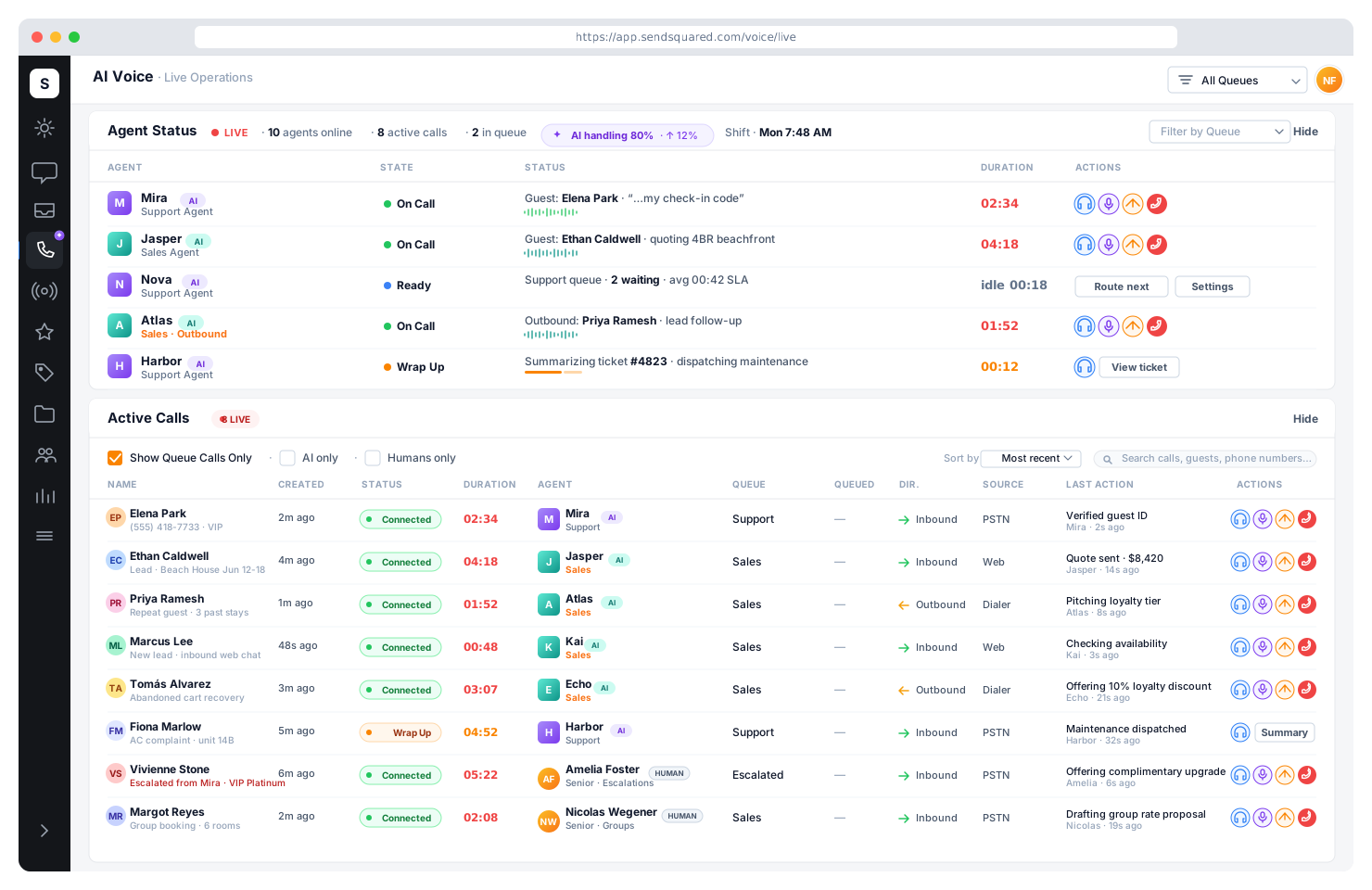
A multilingual AI receptionist that answers every hotel, resort, and vacation rental call 24/7 with the detail of a senior front-desk agent. Native integration with your PMS (Cloudbeds, StayNTouch, Visual One, RoomKeyPMS, Guesty, Hostaway, Streamline, and more) means live availability, accurate rates, and reservation lookups on every call. Sales mode converts inquiries into bookings. Support mode answers guests instantly in 30+ languages. Warm-transfers to your team the moment the caller is ready for a human.
4x
Average stay value vs. online bookings
Calls drive 20% of all bookings in luxury hotels. Direct conversation drives premium revenue.
[ The Cost of Missed Calls ]
The revenue hotels, resorts, and vacation rentals lose at the phone, without realizing it.
Whether it's a front-desk extension, a resort concierge line, or a vacation rental manager's mobile, most operators never measure what's actually leaking. The phone is the most expensive distribution channel they own, and most of it is going to voicemail, hold, or straight to an OTA.
40%
of inbound hotel calls go unanswered
After hours, mid-shift, and during turnover, every missed call is a missed booking.
59%
of bookings flow through OTAs
At 15–25% commission, every call your team misses is a bookable guest sent to Booking.com.
52%
of callers abandon mid-booking
A hold longer than 90 seconds and the prospect is gone, off to the next listing in their tab.
$35–50K
per year for overnight reception
And night coverage still leaves gaps when staff call out, take breaks, or handle two calls at once.
18%
global hospitality staffing deficit
Hiring qualified front-desk agents is harder than ever. Turnover sits at 70–80% in many markets.
85%
of inbound calls are repetitive
WiFi, parking, check-in time, amenity questions. Trained humans answering the same five questions all day.
Sales Mode: Convert Inquiries Into Bookings
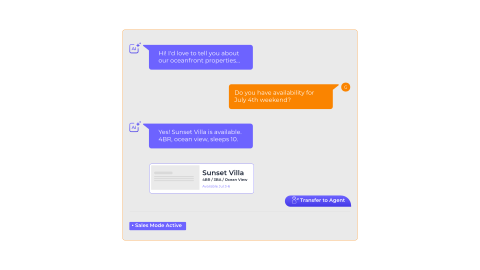
AI Voice answers inquiry calls and describes your properties using rich, detailed descriptions that capture what makes each property special. It handles availability questions, qualifies leads based on their needs, and warm-transfers callers to human agents the moment they're ready to book. Every call is answered, even at 2 AM during peak season.
Rich Descriptions
AI describes properties with the detail a human agent would use.
Lead Qualification
Handles availability and qualifies prospects by stated needs.
Warm Transfer
Hands off to humans the moment the caller is ready to book.
24/7 Coverage
Every inquiry captured, peak season or 2 AM, no exceptions.
[ With AI at the Front Desk ]
A receptionist that scales with demand, not with payroll.
Every call answered on the first ring. Every booking captured. Every guest spoken to in their own language. Every property covered around the clock, at a fraction of one full-time hire.
Every booking captured
Inquiry calls answered instantly: never to voicemail, never to hold. Bookings recovered that previously went to OTAs.
Direct bookings recovered
Convert callers before they hang up and book on Booking.com, recapturing 15–25% margin per reservation.
24/7 coverage without hiring
Front-desk-level answers at 2 AM, on holidays, and during peak season, with no overnight headcount required.
30+ languages, native
Spanish, French, German, Mandarin, Arabic, Japanese: answered in the caller's language on the first word.
One AI across every property
Multi-property aware. A single AI handles all your locations with per-property knowledge and routing.
80–90% lower than night staff
Pay per call answered, not per shift. Unlimited concurrent calls means surge volume costs the same as steady volume.
Support Mode: Instant Answers for Every Guest
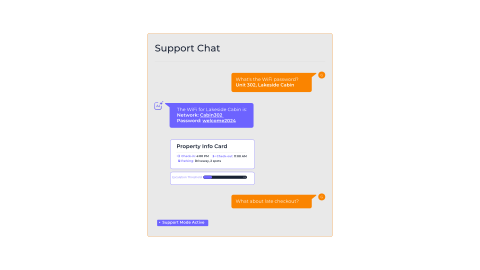
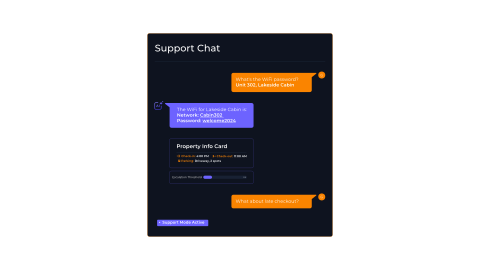
Guests call with questions about check-in times, parking, WiFi passwords, amenity details, and property policies. AI Voice handles these common questions instantly with accurate, property-specific answers, freeing your staff to focus on complex issues and high-value interactions. When the AI reaches its escalation threshold, it transfers with full conversation context.
Instant Answers
Check-in times, property info, amenity details answered instantly.
Property Context
Parking, WiFi, and policy answers specific to the exact unit.
Smart Escalation
Hand-off includes full conversation context for human agents.
Lower Volume
Offloads routine calls so staff focus on complex, high-value work.
Multilingual AI Receptionist: 30+ Languages
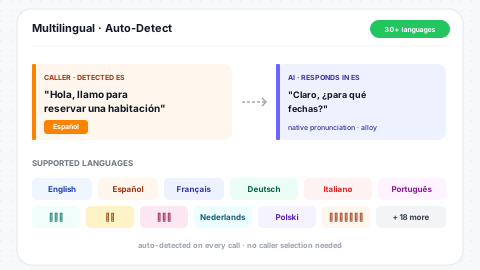
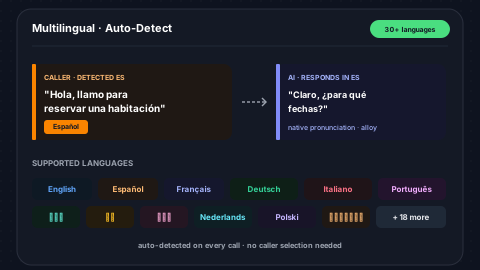
An international guest dials in. The AI detects the language on the first word and responds natively: no caller selection, no language menu, no broken translation. Coverage spans English, Spanish, French, German, Italian, Portuguese, Dutch, Polish, Japanese, Mandarin, Cantonese, Korean, Arabic, Hebrew, Russian, Turkish, and more. For European resorts, urban hotels with international guests, and vacation rentals on Airbnb's global marketplace, multilingual coverage is the difference between booking the call and losing it.
30+ Languages
English, Spanish, French, German, Italian, Portuguese, Mandarin, Japanese, Arabic, and more.
Auto-Detect
Caller language detected on first utterance, no manual selection.
Native Pronunciation
Voice synthesis is native to each language, not English-accented.
International Coverage
Built for hotels and rentals serving guests from every region.
[ 30+ Languages ]
Guests hear their own language.
Full production quality
Supported
Additional languages available on request.
Native PMS Integration: Live Data on Every Call
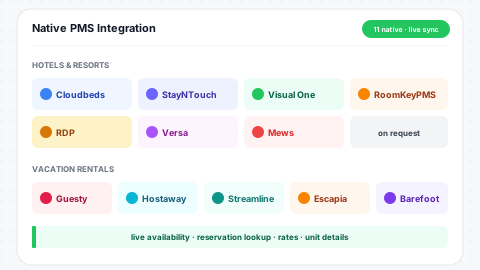
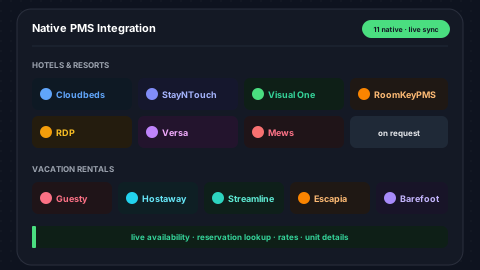
A generic AI receptionist routes calls. A hospitality AI receptionist answers them, because it's connected to your PMS. SendSquared AI Voice has native real-time integrations with Cloudbeds, StayNTouch, Visual One, RoomKeyPMS, RDP, and Versa for hotels and resorts; Guesty, Hostaway, Streamline, Escapia, and Barefoot for vacation rentals. The AI queries your PMS live during the call (availability, rates, reservation status, unit details), so callers get current answers, not stale data. Mews, Hostfully, and custom in-house systems supported on request.
Live PMS Sync
Availability, rates, reservations queried during the call in real time.
Hotel & VR Coverage
11 native PMS integrations across hotels, resorts, and vacation rentals.
Multi-Property
Per-property knowledge with single agent across the portfolio.
Custom PMS
Mews, Hostfully, and in-house PMS systems supported on request.
[ One Platform · Phone · SMS · AI · Humans ]
AI and your team on the same line. Switch between them without friction.
SendSquared includes a full cloud phone system and 2-way SMS, not a third-party drop-in. Your AI receptionist, your human agents, and every call and text live on the same platform, share the same queues, and write to the same guest record. Hand off mid-call to a human with full conversation context, then continue on SMS the next day from the same thread.
SendSquared Phone
A full cloud phone system included, not bolted on. AI agents and human agents answer the same numbers, sit in the same queues, and share the same recording and reporting.
SendSquared SMS
2-way SMS and MMS on the same number guests call. Follow up the call, send confirmations, run pre-arrival sequences, all from the same thread, all logged on the contact record.
Frictionless AI ↔ Human Handoff
Because AI and humans run on the same platform, handoff isn't a transfer to another vendor. It's a single warm-transfer inside SendSquared. The caller stays on the line, your agent picks up with the full conversation summary in front of them, and every call note, SMS thread, and reservation history is already on the contact record. Switch directions if the AI can handle the rest. Continue the conversation tomorrow over SMS. Nothing gets dropped.
Same queues
AI agents and humans sit in the same priority queue, so you set who answers first.
Warm transfer + context
Caller stays on hold music; agent picks up with full transcript summary.
One guest record
Calls, SMS, AI transcripts, reservations, notes: all on the same contact.
Plugs Into Your Booking Stack
Where SendSquared doesn't own the data, we integrate. Live PMS lookups during calls, booking-engine deep links for direct conversion, and inbound messaging from the channels guests already use.
Property Management (PMS): live data on every call
Booking Engines: direct-book links generated mid-call
Inbound Messaging Channels: guests reach you where they already are
Custom integrations and in-house systems supported on request.
Knowledge Base & Training
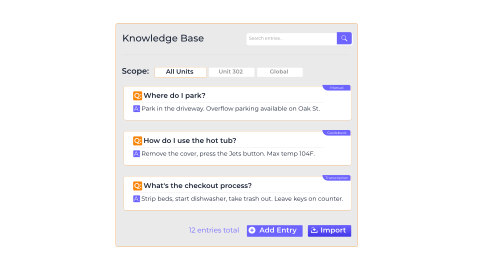
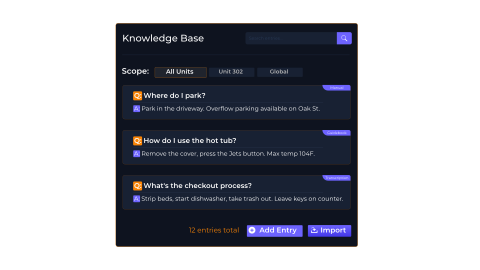
Build a Q&A knowledge base that your AI agent searches during every conversation. Add entries manually, auto-extract from call transcriptions, or import directly from your unit guidebooks. Knowledge entries can be company-wide or scoped to a specific AI agent. Unit-specific entries give the AI property-level answers, so when a guest asks about a specific unit's parking situation, the AI pulls the right answer.
Live Search
Q&A base searched during every call, not trained offline.
Three Sources
Manual entries, transcription extraction, and guidebook import.
Scoped Access
Company-wide or agent-specific knowledge scoping per entry.
Unit-Level
Unit-specific entries give property-accurate answers every time.
Tool Calling & Live Data Access
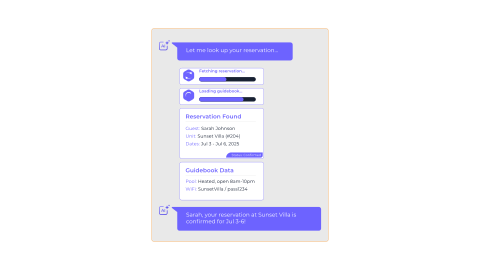
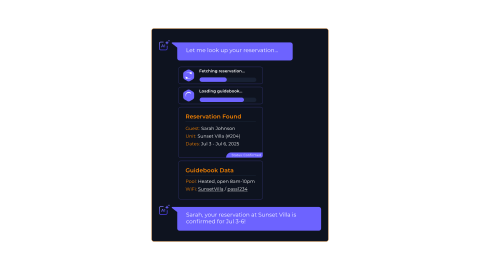
AI Voice does more than recite scripts. It calls tools to look up live data during conversations. When a guest asks about their reservation, the AI fetches it in real time. When they ask about a unit's amenities, it pulls the guidebook. Six built-in tools give the AI access to unit details, reservation records, guidebook content, contact information, interaction history, and the knowledge base, all invoked automatically based on conversation context.
Reservation Lookup
Live reservation lookup by contact or confirmation code.
Unit & Guidebook
Pulls unit details and guidebook content mid-conversation.
Contact History
Contact information and interaction history on demand.
KB Search
Knowledge base search scoped by unit for precise answers.
Warm Escalation to Human Agents
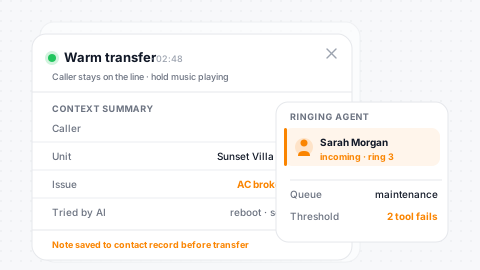
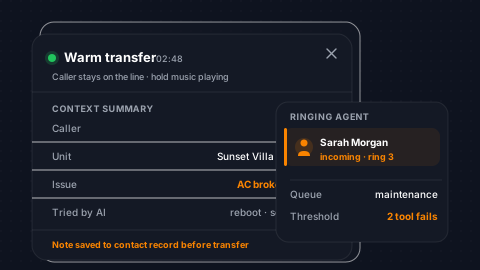
When a caller needs human assistance, the AI warm-transfers seamlessly. The caller stays on the line, hearing hold music, while the call hands off in the background and re-queues to your human agents. The escalation includes a context summary so your agent knows exactly what was discussed. The AI can also create notes on the contact record before escalating, documenting issues like 'Caller reported broken AC in unit 204.'
Seamless Hand-Off
Caller stays on the line through the entire transfer process.
Context Summary
Human agent gets the full summary of what was discussed.
Pre-Escalation Notes
AI writes contact notes before handing off, so nothing is lost.
Configurable Threshold
Escalation threshold configurable by failed-tool-call count.
PMS Context on Every Call
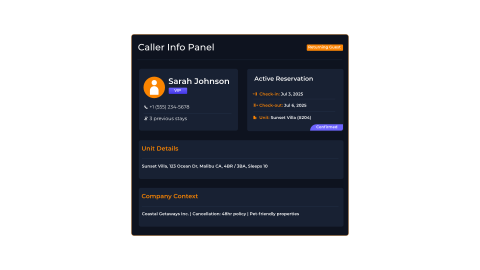
The moment a call connects, the AI loads full context from your PMS, including the caller's name, their active reservation, the unit they're staying in, and your company details. In sales mode, this means the AI knows if the caller is a returning guest. In support mode, it means instant answers about their specific stay without asking for a confirmation code.
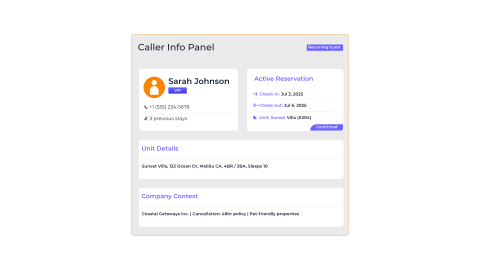
Caller ID
Name and phone number lookup instantly on call connect.
Active Reservation
Dates, status, and unit pulled for the active stay on ring.
Unit Details
Address and property details loaded before the first word.
Return Guest
Returning guest recognition for genuinely personal conversation.
Hear the AI Voice Agent Live
Schedule a 15-minute demo and we'll call your phone with the AI agent so you can experience it firsthand.
Queue Integration & Unified Routing
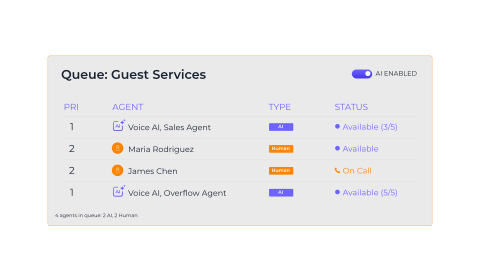
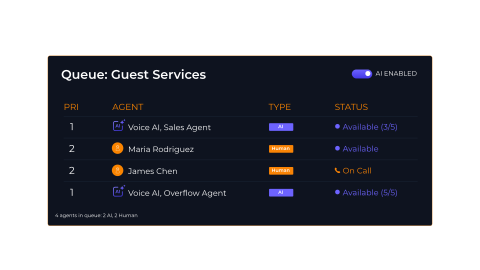
AI agents join your call queues alongside human agents with configurable priority. Set an AI agent at priority 1 to answer first, or at priority 3 as overflow behind your human team. The routing engine merges AI and human candidates into a single priority-sorted list, so your call flow works exactly how you design it. Toggle AI participation on or off per queue whenever you need to.
Priority Levels
Configure AI agents at priority 1 for first-answer or higher for overflow.
Unified Routing
AI and human candidates merge into a single priority-sorted list.
Per-Queue Toggle
Enable or disable AI participation per queue on demand.
Overflow Safety
AI handles peak-season overflow so no call goes unanswered.
Capacity Management
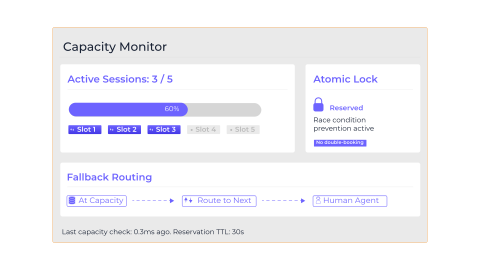
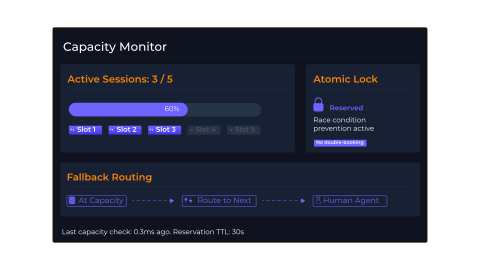
Every AI agent handles unlimited concurrent calls: there is no per-seat license, no capacity ceiling, and no hold queue. The routing engine still uses atomic reservations to track every active session for analytics and isolation, but capacity scales instantly with demand. Route calls between specialized agents (sales vs. support, language-specific, property-specific) based on priority, schedule, and caller context, without ever worrying about a busy signal or an overflow ceiling.
Unlimited Concurrent
Every agent answers unlimited simultaneous calls. No busy signals, no hold queue.
Atomic Tracking
Per-session reservations track every active call for analytics and isolation.
Smart Routing
Specialized agents handle the right calls, by priority, language, or property.
Real-Time Metrics
Live session counts, concurrency, and load metrics across every agent.
Session Tracking & Transcripts
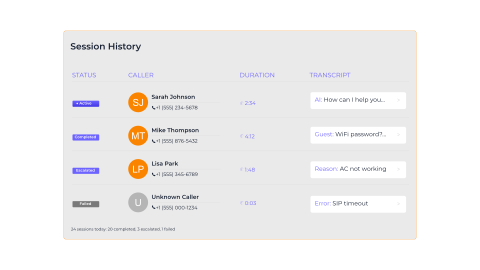
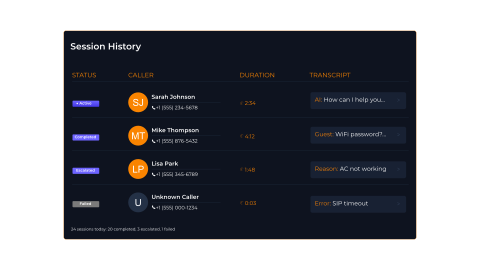
Every AI call session is tracked from start to finish. Status progresses through active, completed, escalated, or failed, with timestamps, duration, and full conversation transcripts stored for review. Escalated sessions record the reason and the human agent who took over. Failed sessions capture the error context. Three layers of session cleanup ensure no orphaned sessions consume capacity.
Full Transcripts
Every conversation transcript stored per session for review.
Status Tracking
Active, completed, escalated, failed: every state tracked.
Escalation Audit
Escalation reason and receiving agent recorded every time.
Three-Layer Cleanup
Callback, status check, and stale sweep keep sessions clean.
AI Agent Configuration
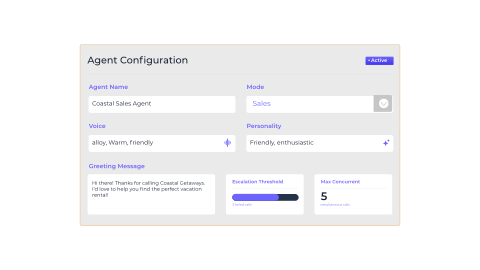
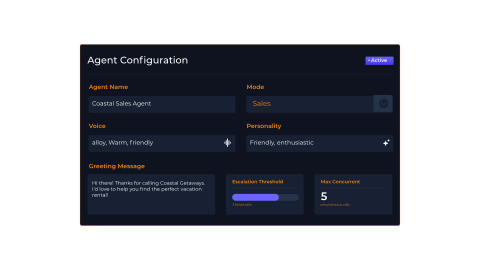
Configure each AI agent with a name, mode (sales or support), voice selection, personality tone, custom greeting, system prompt, and escalation threshold. Every agent handles unlimited concurrent calls by default, with no seat caps to manage. Create multiple agents with different configurations, like a friendly sales agent for inquiry lines and a professional support agent for guest services. Activate and deactivate agents independently.
Sales or Support
Two modes with distinct conversation behaviors out of the box.
Voice & Tone
Voice selection and personality tone per agent.
Custom Prompts
Custom greeting message and system prompt for each agent.
Thresholds
Configurable escalation threshold and concurrent call limits.
Contact AI Routing Preferences
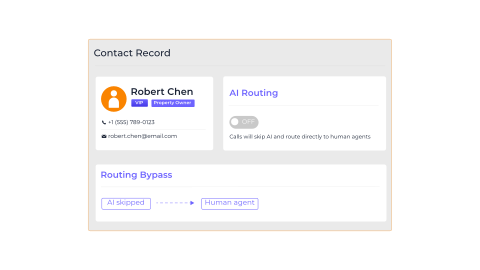
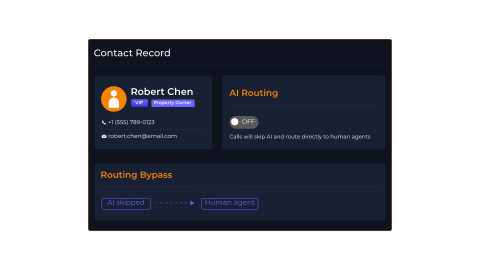
Some callers should always reach a human - property owners, VIP guests, or anyone who requests it. Mark any contact to bypass AI routing entirely, and the system will connect them directly to a live agent regardless of queue configuration. Your team controls who gets AI and who gets a person.
Per-Contact Bypass
Mark any contact to skip AI and reach a human directly.
VIP Exemption
VIP guests and property owners exempt from AI handling.
Auto-Respected
Routing engine respects preferences on every call automatically.
Full Visibility
See exactly who is opted out and why at any time.
Usage Metering & Analytics
Every AI session records granular usage metrics for billing and optimization. Speech-to-text audio seconds, LLM prompt and completion tokens, text-to-speech characters, function call counts, and total call duration are all tracked per session. These metrics feed into your billing dashboard and help you understand AI cost per call, per agent, and per queue.
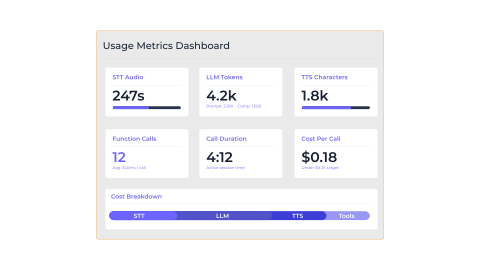
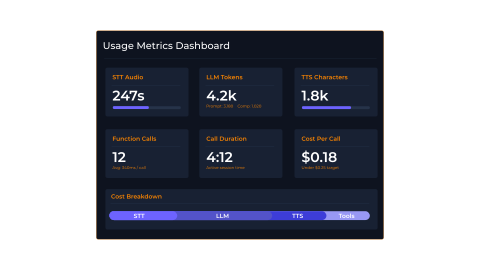
STT Audio Seconds
Speech-to-text audio seconds tracked per session for billing.
LLM Tokens
Prompt, completion, and total token counts per session.
TTS Characters
Text-to-speech character metering for voice synthesis.
Function Calls
Function call count and duration for tool usage analysis.
[ How It Works ]
Every call is understood, handled, or routed to the right person.
01
Reservation call
02
After-hours inquiry
03
Guest request during stay
04
Check-in coordination
05
Complex matter
Recognizes returning guests
Identifies repeat callers, greets them by name, and references their last stay before they speak.
Sarah Jenkins
Last visit: 2 months ago
"Welcome back, Sarah! Would you like your usual corner table?"
Upsells at the right moment
Offers upgrades, late check-out, or breakfast packages when the context is right, never as a script.
Sends confirmations automatically
Booking details, check-in links, and directions, sent via SMS or WhatsApp the moment a reservation is confirmed.
Your reservation is set for Oct 12–15.
[ Cost & Coverage Comparison ]
In-house, answering service, or AI receptionist?
Most hotels run some combination of all three. Here's what each option actually delivers, and what it costs to keep it running.
Traditional
In-house Receptionist
$3,000–5,000/mo per seat
Plus benefits, PTO, training, and turnover cost.
- One call at a time per agent
- No coverage during breaks, sick days, or PTO
- 70–80% annual turnover in many markets
- Overnight + weekend coverage requires multiple hires
- Highest empathy ceiling for sensitive guest issues
- Full PMS access (in theory, though it varies by training)
Outsourced
Answering Service
$400–1,500/mo + per-min
Plus surcharges for after-hours and overflow.
- No live PMS access, so answers are guessed or escalated
- Generic scripts, no property-specific knowledge
- No upsell, no qualified booking conversion
- High call abandonment during peak surges
- Cheap baseline coverage for off-hours overflow
- Humans on the line if guests insist
SendSquared
AI Receptionist
Per-minute pricing · unlimited concurrent
No seat licenses, no overtime, no overflow surcharges.
- Unlimited concurrent calls, never a hold queue or busy signal
- Native PMS integration: live availability, rates, reservations
- 30+ languages, detected automatically on first word
- 24/7 coverage at the same per-call cost as business hours
- Sales mode converts inquiries; support mode answers FAQs
- Warm transfer to a human with full conversation context
Most hotels see AI handle 70–85% of call volume, with the remaining 15–30% warm-transferred to staff who now focus on high-value guest issues.
[ The Hotel Stays in Control ]
You set the rules. The AI follows them on every call, every time.
Compliance, recording, escalation, and oversight are first-class concerns, not afterthoughts. Your team always knows what the AI said, can search it, and can override it.
Property rules enforced
Per-property pricing, policy, and answer scope. The AI never invents a rate or invents a policy your front desk doesn't honor.
Every call recorded + transcribed
Full audio + searchable transcript per session. Replay any conversation, audit any answer, train your team from real calls.
GDPR + PCI compliant
EU data residency option, PCI-DSS scope minimization, and SOC 2-aligned controls. Payment details routed through compliant rails only.
Management dashboard
Live session view, call volume by hour, escalation rates, language distribution, conversion-to-booking: all in one console.
Continuous improvement loop
Failed answers, abandoned calls, and escalations surface as KB-improvement suggestions. The AI gets sharper every week.
Escalation thresholds
Per-agent failure thresholds, per-contact AI bypass, and per-queue toggles. Send sensitive matters straight to a human.
[ Operational in Weeks, Not Months ]
From demo to live on your phone line, in three steps.
No multi-month integration. No massive change-management project. Just a focused pilot that's answering real calls within two weeks.
01
1 hourDemo call on your scenarios
We bring a working AI agent on the line and walk through your actual call patterns: peak-season inquiry, late-night WiFi reset, weekend complaint, late-checkout request. You hear it; you stress-test it.
- Live AI on a real phone call
- Your scenarios, not canned ones
- No commitment, no setup needed
02
~2 weeksPilot: configure, connect, deploy
Our team configures sales and support modes, connects your PMS, imports your guidebook content, and routes a forwarded number (or full queue) to the AI. Pilot runs alongside your existing team, with no risk to live operations.
- PMS integration + KB import
- Forwarded line or queue overflow
- Side-by-side with current staff
03
Week 3+Full production
Promote the AI to primary on your inbound number, or keep it as overflow. Your call. Dashboard tracks every call, escalation, language, and conversion. Knowledge base refines weekly from real conversation data.
- Primary line or overflow, your call
- Weekly KB refinement loop
- Full-team training included
Also works for
Vacation rentals, serviced apartments, condo-hotels, boutique hotel groups, multi-property resorts, glamping operators, holiday parks, and short-term rental management companies.
Replace Your After-Hours Answering Service
AI Voice handles calls 24/7 with full reservation context. No per-minute fees, no missed calls.
AI Voice runs on top of SendSquared's cloud phone system with call queues, IVR routing, call recording, and voicemail transcription, so AI agents and human agents share the same numbers, queues, dispositions, and reporting. Every call thread lands on the caller's record in the vacation rental CRM or hotel CRM alongside reservations and messaging history. The same knowledge sources that power AI Voice (including imported content from your digital guidebooks) keep call answers consistent with what guests see in their pre-arrival materials.

Frequently Asked Questions
What is a hospitality AI receptionist?
A hospitality AI receptionist is a voice agent that answers your inbound phone line like a front-desk associate, resort concierge, or vacation rental manager would, taking reservations, answering policy and amenity questions, looking up active stays, and warm-transferring complex requests to a human. It works the same whether you run a single boutique hotel, a multi-property resort group, or a portfolio of vacation rentals on Airbnb, Vrbo, and direct. Unlike a generic AI receptionist service, a hospitality-grade AI receptionist (like SendSquared) is natively integrated with your PMS (Cloudbeds, StayNTouch, Visual One, Guesty, Hostaway, Streamline, and more), so every answer is grounded in live property, unit, rate, and reservation data.
Does the AI receptionist support multiple languages?
Yes. SendSquared AI Voice handles inbound calls in 30+ languages including English, Spanish, French, German, Italian, Portuguese, Dutch, Polish, Mandarin, Cantonese, Japanese, Korean, Arabic, Hebrew, Russian, Turkish, and more. The agent automatically detects the caller's language and responds in kind, which matters for international hotels, resorts, and vacation rentals serving a global audience.
Which PMS systems does the AI receptionist integrate with?
Native, real-time bidirectional integrations with Cloudbeds, StayNTouch, Visual One, RoomKeyPMS, RDP for hotels and resorts; Guesty, Hostaway, Streamline, Escapia, and Barefoot for vacation rentals. The AI queries the PMS live during the call (availability, rates, reservations, unit details), so callers get current answers, never stale data. Mews, Hostfully, and custom in-house PMS systems are supported on request.
How does an AI voice agent answer hotel, resort, and vacation rental calls 24/7?
An AI voice agent answers every inbound call instantly, including overnight, weekend, and holiday calls, using a hospitality-trained voice model with live PMS lookups. It can describe properties and individual rental units, check availability and rates, take messages, and warm-transfer to your team or to the on-call vacation rental manager during business hours. Whether the caller is asking about a beachfront resort suite at 2 AM during peak season or a mountain cabin on a Sunday morning, no inquiry is missed.
Can AI voice agents increase direct bookings for hotels, resorts, and vacation rentals?
Yes. AI voice agents convert inbound inquiry calls by describing properties or units in detail, qualifying leads, and warm-transferring ready-to-book callers to a human agent. Because the AI catches calls staff would otherwise miss (after hours, during turnover, when lines are busy, or while the vacation rental manager is showing another property), hotels, resorts, and vacation rental operators typically recover bookings that previously went to OTAs (Booking.com, Expedia, Airbnb, Vrbo) or to voicemail.
How is the AI receptionist different from a traditional IVR phone tree?
A traditional IVR forces callers through a press-1-for-sales menu and routes mechanically. An AI receptionist has a natural conversation. The caller speaks normally, the AI understands intent, accesses live PMS data, and resolves the call directly or routes intelligently. No menus, no "did you mean X" loops. Callers finish the call instead of hanging up.
What is AI call routing for hotels, resorts, and vacation rentals?
AI call routing uses a voice agent to triage inbound calls based on the caller's intent (reservation inquiry, support question, billing, owner request, or VIP guest), then either answers directly or transfers to the right team with full context. For hotels and resorts that means routing to front desk, reservations, housekeeping, or revenue management; for vacation rental operators it means routing to the unit owner, the cleaning team, maintenance, or the booking agent. It replaces traditional IVR menus with natural conversation, eliminating press-1-for-sales trees.
What modes does AI Voice support?
Sales mode converts inquiries into bookings with rich property descriptions. Support mode answers common guest questions instantly. Both modes use full PMS context.
How does AI Voice know about my properties?
A Q&A knowledge base is searchable during live calls. Add entries manually, extract from call transcriptions, or import directly from your unit guidebooks.
What happens when the AI can't answer a question?
The AI warm-transfers seamlessly - the caller stays on the line while the call re-queues to your human agents with a full context summary of what was discussed.
Can I exclude certain callers from AI handling?
Yes. Mark any contact to bypass AI routing entirely - property owners, VIP guests, or anyone who requests it will connect directly to a live agent.
How many calls can an AI agent handle at once?
Unlimited. Every AI agent answers unlimited simultaneous calls: no per-seat license, no hold queue, no busy signal. Capacity scales instantly with demand, so a surge of inquiries during a hurricane diversion, a flash promotion, or a Friday-night booking rush is handled the same as a single 2 AM call. The routing engine still respects per-agent priority, schedule, and language scoping, but there is no capacity ceiling to manage.
Ready to Get Started?
See how SendSquared can transform your hospitality operations.
Schedule a DemoExplore More
Related Solutions
AI Voice for Hotels
24/7 reservation and guest service for hotels with PMS context
AI Voice for Vacation Rentals
Unit-aware AI agent across the full VR portfolio
AI Voice for Resorts
Multi-property resort coverage with amenity-aware routing
Call Tracking & Revenue Attribution
AI-powered call handling with full attribution
Inbound Lead Conversion
24/7 AI agents converting inquiries
Explore More
Related Reading
Best Hotel Voice AI Agents in 2026
Comparing leading hotel voice AI products including Canary, KITT, Viva, Myma, Aiello, Riviera, and SendSquared
How AI Voice Agents Take Reservations
End-to-end walkthrough of AI voice handling reservations with live PMS context
Hotel Voice AI vs Traditional IVR
Cost, resolution rate, and guest satisfaction comparison
Voice AI for Vacation Rental Property Managers
How vacation rental managers use AI voice for owner and guest calls
After-Hours Answering for Hotels
Capturing after-hours booking inquiries with AI voice
AI Voice Cost Savings for Hospitality
Quantified cost savings from AI voice deployment