

One Engine, Every Guest
The same guidebook,
reimagined for every trip.
SendSquared reads each reservation, who is coming, why, and what they booked, and rebuilds the guidebook to match. The content, the recommendations, even the colors change per guest, automatically.
Scroll to watch it adapt ↓
Guys Golf Trip.
Four buddies, a Saturday tee time, a rental SUV. SendSquared reads the booking and builds the guidebook around the trip: tee times up top, the steakhouse over the salad bar, all wrapped in fairway green.
- Palette shifts to fairway green
- Golf blocks pinned to the top
- Steakhouse & sports-bar picks surfaced
- Spa & family content hidden
Welcome, Mike & the Crew
Villa 12 · Sea Pines
Oct 3 – 7 · 4 guests
Conditional Visibility Rules
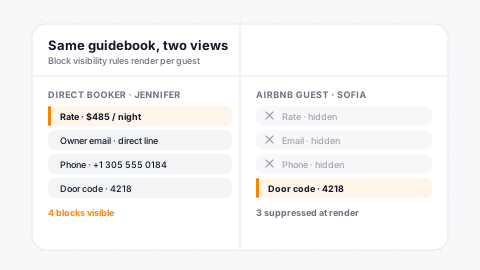
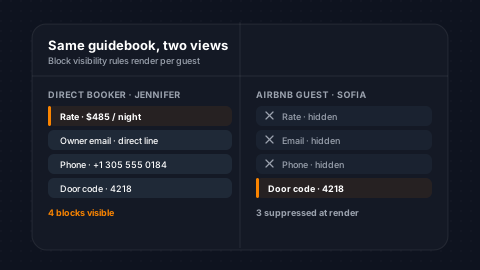
Not every guest should see the same content. Guidebook-level conditions control OTA content hiding (price, email, phone number) based on reservation source or unit data. Block-level conditions control individual section visibility. Conditions evaluate against live reservation and unit properties with AND/OR logic. Show different check-in instructions for different units, hide pricing for Airbnb guests, or reveal VIP content for repeat visitors.
Guidebook-Level
OTA price and contact hiding based on reservation source or unit.
Block-Level
Per-section visibility rules hide sensitive content selectively.
AND/OR Logic
Operators like equals, contains, and in-list compose full logic.
Render-Time Eval
Conditions evaluate against live reservation data at view time.
Girls Spa Trip.
A girls' weekend, a Friday check-in, a wellness add-on at booking. The same engine rebuilds the guidebook, spa first, sunrise yoga, rosé on the cabana, in a blush palette that feels like the trip.
- Palette shifts to blush rose
- Spa & wellness blocks pinned to the top
- Brunch & rosé picks surfaced
- Golf & sports content hidden
Welcome, Dana & the Girls
The Dune House · Palm Suite
May 9 – 12 · 5 guests
Theming, Branding & PDF Export
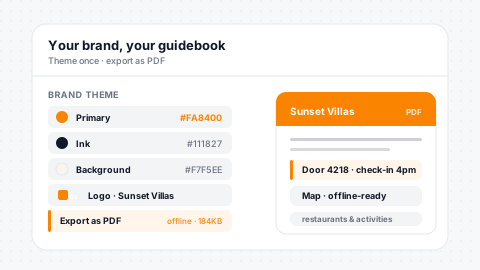
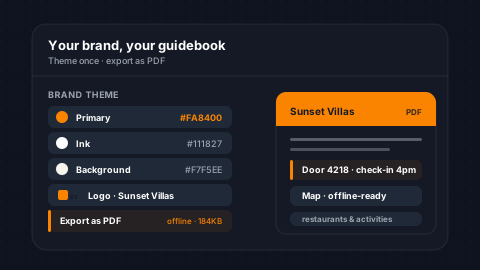
Make every guidebook feel like your brand. Custom primary, secondary, and background colors. Upload a background image for texture. Add your company logo with Open Graph meta tags for professional social sharing. Collapsible headers keep long guidebooks scannable. Guidebooks are PDF exportable, so guests can save a copy for offline access, ideal for properties with limited connectivity.
Full Theming
Primary, secondary, and background colors plus background image.
OG Meta Tags
Company logo with Open Graph tags for polished social sharing.
Collapsible Headers
Default-collapsed option keeps long guidebooks scannable.
One-Click PDF
Guests save a PDF copy for offline access anywhere.
Custom Block Type Ordering
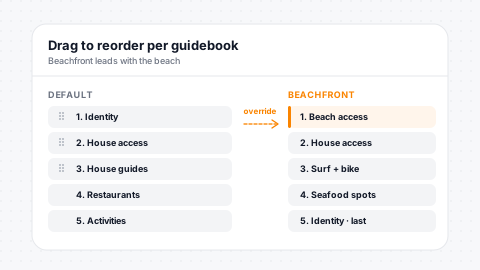
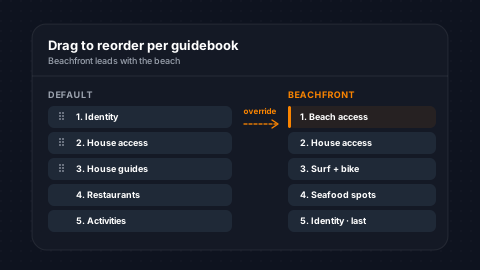
Define the category order for each guidebook. Show Identity first, then House Access, then Restaurants, or whatever sequence makes sense for your guest experience. A default ordering is applied automatically, but each guidebook can override it. Blocks within each category follow their own display order for fine-grained control.
Custom Order
Define the category order for each guidebook individually.
Smart Defaults
Sensible default ordering out of the box, overridable per book.
Within-Category
Display order control inside each category for fine grain.
Drag-and-Drop
Reorder blocks by dragging, and changes save instantly.
Rain in the forecast?
A washout Saturday rolls in. The guidebook checks the forecast and quietly reshuffles, beach day out, aquarium and covered dining in, so the day still works.
- Rainy-day picks move to the top
- Beach & pool blocks pushed down
- Indoor dining surfaced
- Palette cools to overcast blue
Welcome, The Bennett Family
Oceanfront 214
Aug 14 – 18 · 5 guests
Maps, Photos & Rich Content
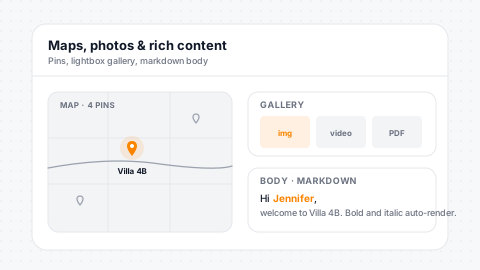
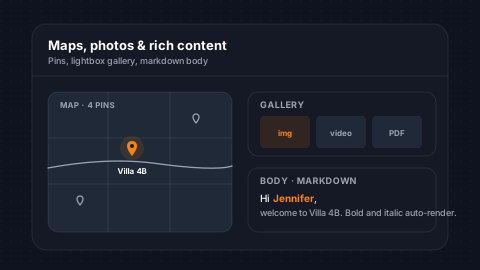
Every block can include a Google Maps location with color-coded markers visible on an interactive map view. Photo galleries support image, video (MP4), and PDF assets with per-asset display ordering and thumbnail sizing. Block descriptions support HTML, Markdown, and plain text, auto-converted for clean rendering. Merge fields work in descriptions for dynamic content.
Google Maps
Interactive map view with color-coded markers per block.
Rich Galleries
Image, video, and PDF assets in carousel displays per block.
Multi-Format
HTML, Markdown, and plain text auto-convert to clean rendering.
Dynamic Merges
Merge fields work inside descriptions for personalized content.
Can't find the door code?
SendSquared reads the guest's messages across SMS, WhatsApp, and Airbnb. The moment Jordan asks where the door code is, the guidebook pins check-in to the top, and ask about the dishwasher next, and that guide jumps up too. Confusion fixed before it becomes a one-star review.
- Reads guest messages in real time
- Surfaces the exact block they need
- Door code & dishwasher pinned up top
- Heads off the support call
Welcome, Jordan · Unit 7
Harbor Cottage
Checking in now
Powered by the Unified Inbox
Your guidebook listens to every channel
Because guidebooks share the same guest record as your unified inbox, every SMS, WhatsApp, and Airbnb message becomes a signal. The guidebook reads the thread and surfaces the right block, before your team even sees the notification.
Welcome back.
They've stayed three times before. No check-in tutorial needed: the guidebook remembers what they love, skips what they don't, and rolls out the returning-guest perks.
- Greets them as regulars, by name
- Their favorites pinned to the top
- Check-in basics collapsed away
- Loyalty perks unlocked automatically
Welcome, The Hardys
Their usual, Unit 7
Their 4th stay with us
Reservation-Based Guidebooks
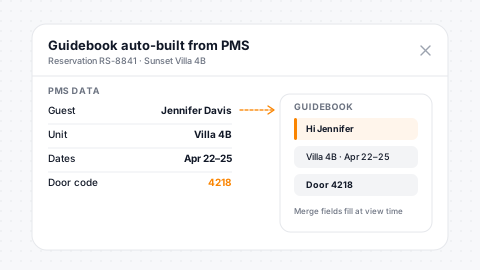
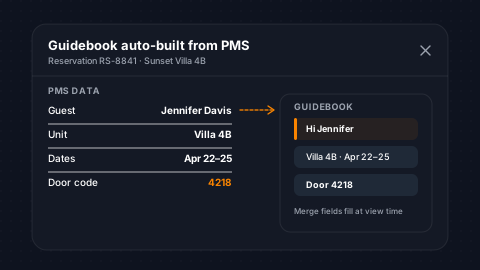
Each guidebook is tied to rental units through your PMS. When a guest receives their guidebook link, it loads with their reservation data: check-in and check-out dates, guest count, unit details, and property photos. Merge fields personalize descriptions with the guest's name, reservation dates, and property-specific information. No manual setup per booking.
Unit-Based Assign
Guidebooks map to units via PMS and load automatically per reservation.
Merge Fields
Guest name, dates, and property content merge per booking.
Swipeable Photos
PMS property photos render in swipeable carousels on every page.
Collapsible Header
Reservation details live in a collapsible header for quick scans.
Nine Content Block Types
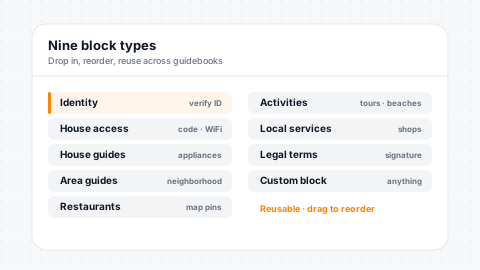
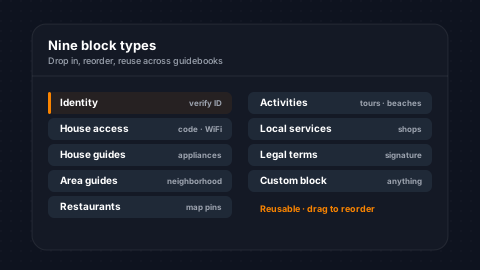
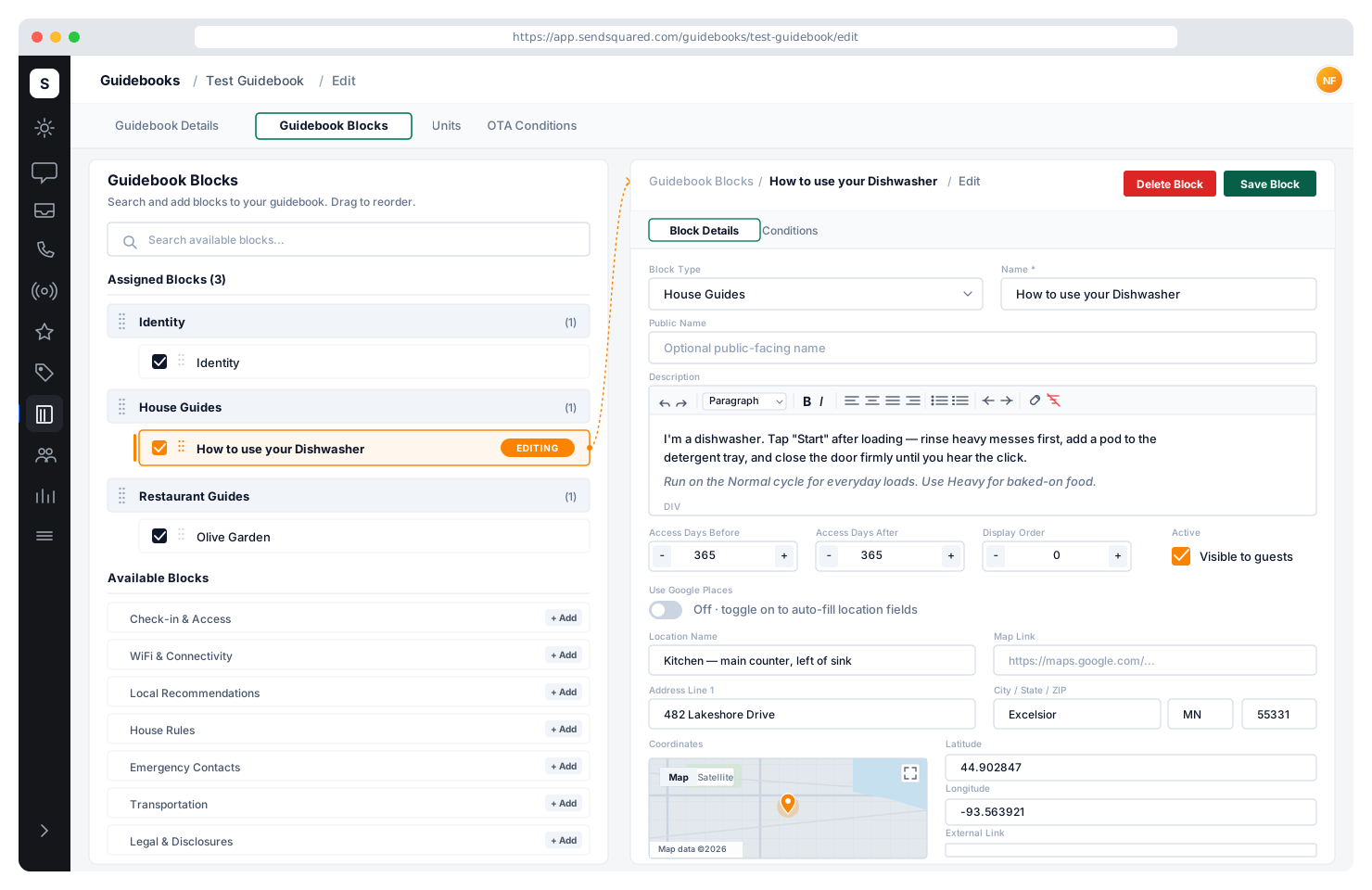
Build guidebooks from nine block types: Identity (ID verification), House Guides (property info), House Access (check-in instructions), Area Guides, Local Guides, Restaurant Guides, Activity Guides, Other Guides, and Legal Terms. Each block has its own name, description, address, map location, photos, rating, and external links. Reuse blocks across multiple guidebooks.
Nine Block Types
Identity, House, Area, Local, Restaurant, Activity, Legal, and more.
Maps & Places
Per-block address with Google Places integration and map coordinates.
Galleries
Swipeable photo carousels with lightbox viewing per block.
Reusable
Assign the same block to multiple guidebooks without duplicating content.
The whole trip, planned.
Every reservation, tour, and dinner they booked, laid out day by day. Guests open the guidebook and the weekend is already organized, no spreadsheet, no group text.
- Bookings auto-added to the timeline
- Sorted by day and time
- Map + directions on every stop
- Updates the moment plans change
Welcome, The Alvarez Party
Lakeview Lodge
Jul 18 – 21 · 6 guests
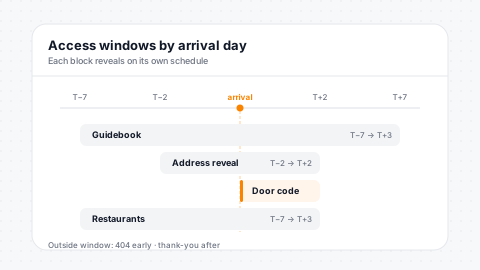
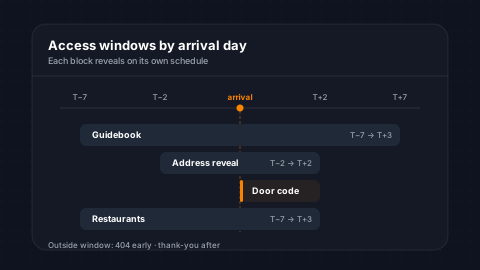
Time-Based Access Windows
Control when guests can access their guidebook and when sensitive information becomes visible. Set access windows in days before and after the reservation. For example, a guidebook might be available 7 days before arrival and 3 days after departure. Separate access windows control when the property address is revealed, preventing early arrivals or address sharing.
Access Windows
Days-before-arrival and days-after-departure windows configurable.
Address Reveal
Separate window for when the property address appears to the guest.
Per-Block Timing
Individual blocks have their own time-based access windows.
Expired Messaging
Expired guidebooks show clean messaging instead of content.
Bring the whole crew.
One guidebook, everyone on the same page. Share it with the whole group: they all see check-in, the plan, and the local picks, and anyone can add their own finds.
- One link for the entire group
- Everyone sees the latest plan
- Guests add their own finds
- No app, no logins, no friction
Welcome, The Whole Group
Beachcomber House
Sep 5 – 9 · 8 guests
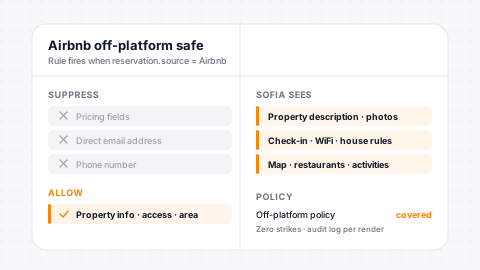
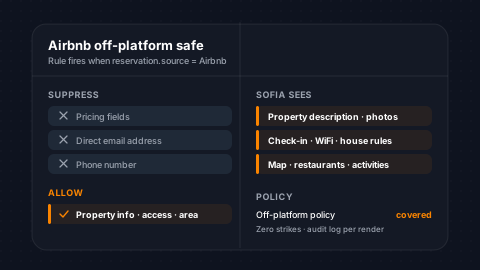
Airbnb Off-Platform Compliance
Airbnb's Off-Platform Policy changed the game, and SendSquared guidebooks are ready. Privacy controls hide pricing, email addresses, and phone numbers from guests whose reservations originate from OTA channels. Condition rules evaluate the reservation source at render time and suppress sensitive content automatically. Curate a premium guest experience that stays fully compliant.
OTA Privacy
Price, email, and phone auto-hide for OTA-sourced reservations.
Render-Time Rules
Condition-based suppression evaluates at view time, not ahead.
Policy Compliant
Compliant with Airbnb Off-Platform and Fee Transparency policies.
Delight + Comply
Branded guidebooks that feel premium while staying compliant.
In-Guidebook ID Verification
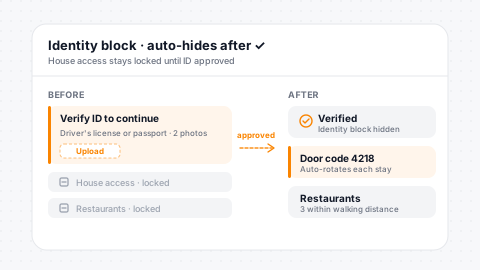
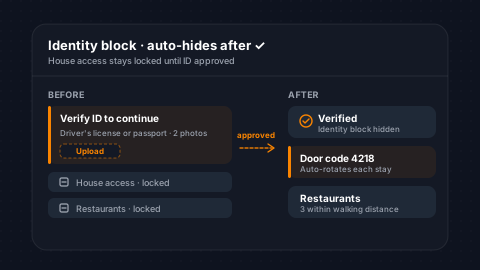
Identity blocks let guests upload verification documents directly through the guidebook. Configure how many documents are required. Uploads go to secure S3 storage with access logging. Once an agent reviews and marks the contact verified, the Identity block hides automatically, replaced by their blue check badge across the platform. Reduce fraud and chargebacks without friction.
In-Book Upload
Guests upload IDs without leaving the guidebook, for zero friction.
Configurable Docs
Set the number of required documents per property or booking.
S3 + Audit
Encrypted S3 storage with full access-log audit trail.
Auto-Hide Block
Block disappears after verification, replaced by blue check badge.
Legal Terms & Acceptance
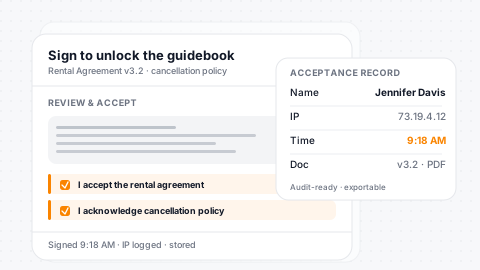
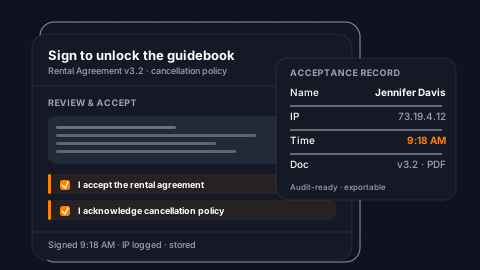
Legal Terms blocks gate all other guidebook content until the guest accepts. Require a signature name, email, and cancellation acknowledgement before any property information is revealed. Acceptance records track the guest's IP address, timestamp, and submitted data per reservation. Acceptances fire a workflow trigger, letting you automate follow-up based on legal term completion.
Gate Content
All guidebook content hides until guest signs the legal terms.
Signature Capture
Capture signature name, email, and cancellation acknowledgement.
IP + Timestamp
Every acceptance logs IP, timestamp, and submitted data per reservation.
Workflow Trigger
Acceptances fire a workflow trigger for downstream automation.
[ Why SendSquared ]
A guidebook that's part of the whole platform
Standalone guidebook tools leave your guest data stranded in yet another system. SendSquared keeps the guidebook tied to the same guest record that powers your CRM, inbox, marketing, and AI voice.
One guest record, everywhere
The guidebook, your CRM, unified inbox, marketing, and AI voice all read and write the same profile, with no data silos, no re-keying.
Works with any PMS
11+ native integrations, including Streamline, Escapia, Barefoot, Guesty, Hostaway, RDP, Cloudbeds, and Visual One.
Native ID verification
In-guidebook document upload with encrypted storage and a full audit trail, built in rather than bolted on.
Airbnb-compliant by default
Price, email, and phone auto-hide for OTA reservations at render time, so you stay within Off-Platform policy automatically.
Legal Terms that trigger workflows
Gate content behind signature, log IP and timestamp per reservation, and fire automations on acceptance.
Reservation-aware, end to end
Conditional visibility, merge fields, and time-based access all driven by live PMS data, so the guidebook builds itself.
Testimonials
What Our Clients Say
“SendSquared is the second most important thing in our company outside of our PMS. All of our departments use it. Everyone in the company uses SendSquared. The engagement is what keeps us so well connected, and we are adding on average 10 doors a month at this point.”
Steven Wood
Founder, Host and Home
“SendSquared took everything we relied on and made it better, easier to use, and more centralized. Having everything in one platform has been a major improvement for our team.”
Mark Ryan
Revenue Manager, Wilderness Resorts & Waterparks
“In typical SendSquared fashion, it was easier than I expected.”
Brendan Curtin
CMK Development, Sailrock South Caicos
“The SendSquared tape chart has been our lifeline on the road. I used to print the calendar before heading out — now everything is right there, even with last-minute changes.”
Kim Collin
, Caribbean Villas of St. John
“I can definitely attribute a good number of reservations to SendSquared. Between the easy follow-up communication within the system and the CRM pulling up information as a call comes in, our reservations team is being more intentional on their calls, resulting in better conversions.”
Brock Reich
Chief Operating Officer, Orlando Resorts Rental
[ Inside the Builder ]
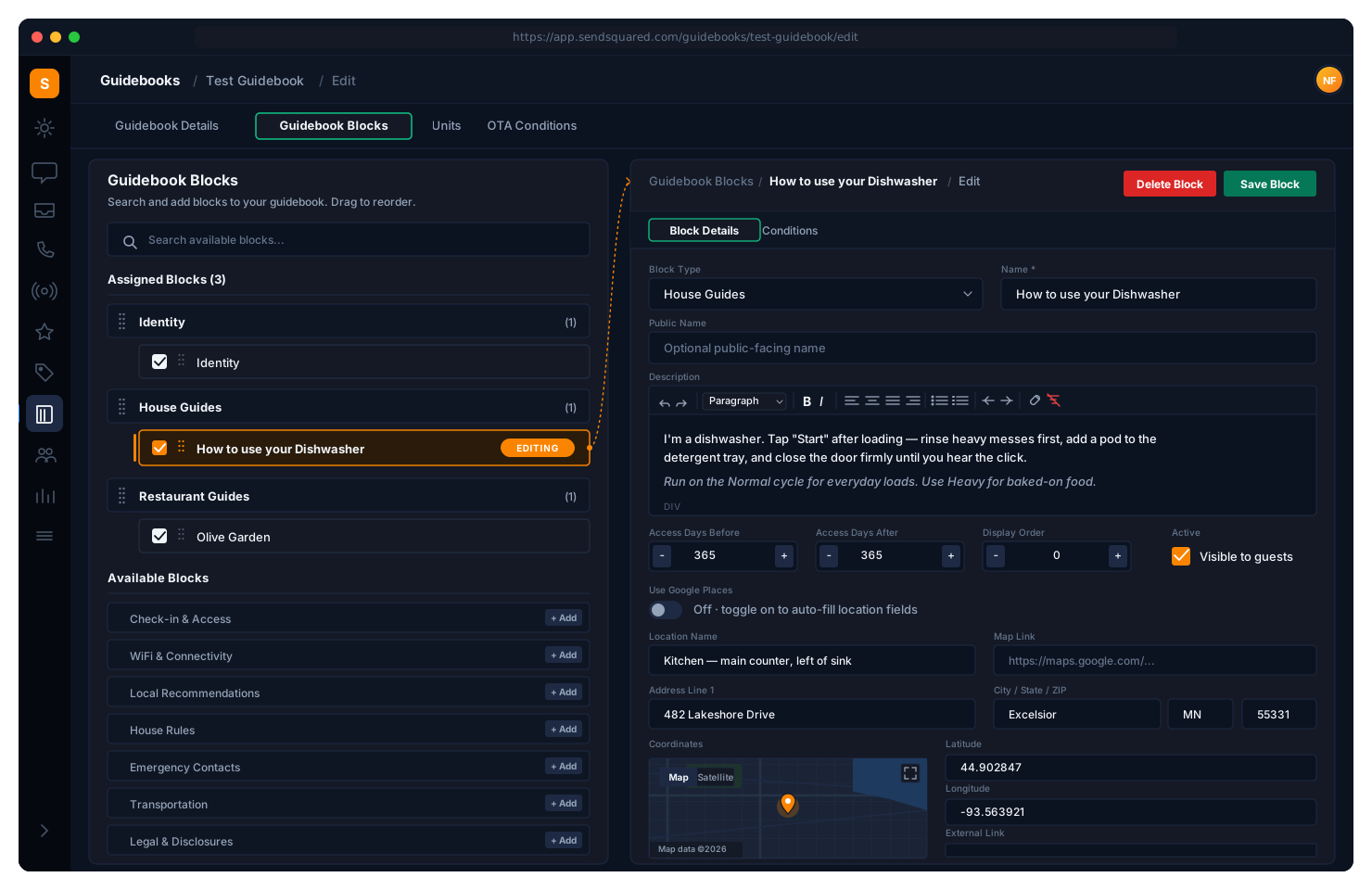
Built in minutes, from your PMS data
WebMCP
A guidebook a guest’s
AI can actually use.
Every guidebook already answers the questions an agent gets asked. WebMCP lets it answer them as callable tools instead of a page to be scraped, scoped to the one reservation the guest is actually holding.
navigator.modelContext.registerTool() -
guidebook.get_arrivalTakes{ }Returns Arrival window, door code, parking and gate instructions for this reservation -
guidebook.get_itineraryTakes{ day?: string }Returns The day-by-day plan already built from the booking, tours and dining included -
guidebook.find_nearbyTakes{ category, party_size? }Returns The property’s own vetted picks, not a generic map search -
guidebook.request_changeTakes{ type, date, note? }Returns An early check-in or late checkout request, logged against the reservation -
guidebook.message_propertyTakes{ text }Returns A thread in the unified inbox, on the same guest record as SMS and email
Two things make this worth doing before the agents arrive. The guidebook is already reservation-scoped, so a declared tool returns this guest’s door code rather than whatever a crawler could reach. And anything that writes back runs through the same inbox and human-in-the-loop consent step this site already uses for its agent tools, so an agent can ask but never quietly act.
Frequently Asked Questions
What is a digital guidebook?
A digital guidebook is a browser-based, PMS-linked welcome book that replaces the printed binder in a vacation rental, hotel suite, or resort villa. Guests open a link on any device and see personalized check-in instructions, WiFi credentials, house rules, local recommendations, restaurant guides, activity bookings, and area maps, all updated in real time, with reservation-aware content that changes per guest, per property, and per booking source.
Why use a digital guidebook instead of a printed welcome book?
A digital guidebook updates in real time when WiFi passwords change, restaurants close, or local conditions shift. Printed books are outdated the day they go to print. It is also personalized per reservation (guest name, dates, unit), trackable end-to-end (engagement, upsell conversion, legal-terms acceptance), and integrates with ID verification, gap-night booking, and PDF offline export. Printed welcome books cannot do any of this.
Do guests need to download an app?
No. Guidebooks are browser-based and load instantly from a link - no app download required. They work on any device.
What is WebMCP, and can an AI agent use my guidebook today?
WebMCP is a proposed browser API that lets a page declare callable tools to an AI agent instead of making the agent scrape the DOM. It is a Draft Community Group Report from the W3C Web Machine Learning Community Group, not a W3C Standard and not on the Standards Track. It shipped behind a flag in Chrome 146 Canary in February 2026, with stable rollout expected around the end of 2026. So the honest answer is: not broadly yet. SendSquared already registers tools through navigator.modelContext on this site, so when agent support lands the guidebook is callable rather than guessed at.
Does this work with Meta Muse or OpenClaw?
Not as a live integration today, and any vendor claiming otherwise is overstating it. Chrome DevTools MCP has experimental operations for listing and executing page-declared WebMCP tools. OpenClaw drives browsers through that same bridge but does not yet surface those tools, though there is an open issue and an open pull request to add them. Meta announced Muse in September 2026 and it plans steps and fills forms in its own cloud browser, but Meta has not said it will speak MCP. What we control is being ready on our side of the connection.
If an agent can call the guidebook, can it change my reservation without asking?
No. Reads and writes are separated. A tool that returns arrival details or the itinerary just answers. Anything that writes back, such as an early check-in request or a message to the property, raises a human-in-the-loop consent step before data leaves the browser, and lands in the unified inbox on the guest record where your team can see it. An agent can ask on a guest behalf. It cannot quietly act.
Are guidebooks compliant with Airbnb policies?
Yes. Privacy controls automatically hide pricing, email, and phone numbers for OTA reservations, keeping you fully compliant with Airbnb Off-Platform and Fee Transparency policies.
Can I require ID verification through the guidebook?
Yes. Identity blocks let guests upload verification documents directly. Once verified, the block auto-hides and a blue check badge appears across the platform.
How are guidebooks personalized per guest?
Merge fields pull reservation data - guest name, dates, unit details - and conditional visibility rules show the right content based on booking source, unit, or guest profile.
Can guests save the guidebook offline?
Yes. Every guidebook is PDF exportable, so guests can save a copy for offline access - ideal for properties with limited connectivity.
What is the difference between a digital guidebook and a printed welcome book?
A digital guidebook is browser-based, personalized per reservation, updates in real time, and surfaces ID verification, gap-night upsells, and on-property recommendations the moment a guest opens it. Printed welcome books are static and outdated the day they print. SendSquared digital guidebooks are the modern replacement: PMS-linked, mobile-first, and trackable end-to-end.
Do digital guidebooks work for hotels as well as vacation rentals?
Yes. The same guidebook engine powers vacation rental, hotel, and resort deployments. Hotels typically use them for in-room digital welcome content, restaurant menus, and amenity bookings; vacation rentals use them for unit-specific check-in instructions, area guides, and verification. The content blocks are the same; the conditional visibility rules render the right blocks per property type.
How does SendSquared compare to Touch Stay digital guidebooks?
Touch Stay is a standalone digital guidebook tool. SendSquared digital guidebooks are part of a complete hospitality platform that also includes the CRM, unified inbox (SMS, WhatsApp, Airbnb, email, voice), AI voice receptionist, ID verification, owner statements, and lifetime value tracking, all sharing the same guest record. The guidebook engine is comparable in features (PMS integration, conditional visibility, photo galleries, branding); the difference is whether you want a single-purpose tool or a unified hospitality platform.
How does SendSquared compare to YourWelcome digital guidebooks?
YourWelcome offers branded digital guidebooks for vacation rentals with in-stay upsells. SendSquared offers all of that plus native PMS integration with 11 systems (including Streamline, Escapia, Barefoot, Guesty, Hostaway), in-guidebook ID verification with audit trails, Legal Terms acceptance with workflow triggers, and unified data with your CRM and messaging platform, so the same guest record powers your guidebook, your inbox, your marketing, and your AI voice receptionist.
How does SendSquared compare to Hostfully digital guidebooks?
Hostfully digital guidebooks ship as part of the Hostfully PMS suite. SendSquared digital guidebooks integrate with any PMS: Hostfully, Guesty, Hostaway, Streamline, Escapia, Barefoot, RDP, Cloudbeds, RoomKeyPMS, StayNTouch, Visual One, and more. If you are tied to a specific PMS, SendSquared lets you decouple the guest-facing guidebook experience from your operational PMS choice.
Ready to Get Started?
See how SendSquared can transform your hospitality operations.
Schedule a DemoExplore More
Related Reading
Digital Guidebooks for Vacation Rentals
Digital guidebook strategy for vacation rental properties
Curated Guest Experiences: The New Norm
How curated digital guides shape modern guest expectations
Hotel Guest Experience Strategies for 2026
Where digital guidebooks fit in the 2026 guest experience stack