


Channel Integration
Your Facebook Page Is Someone's First Message To You
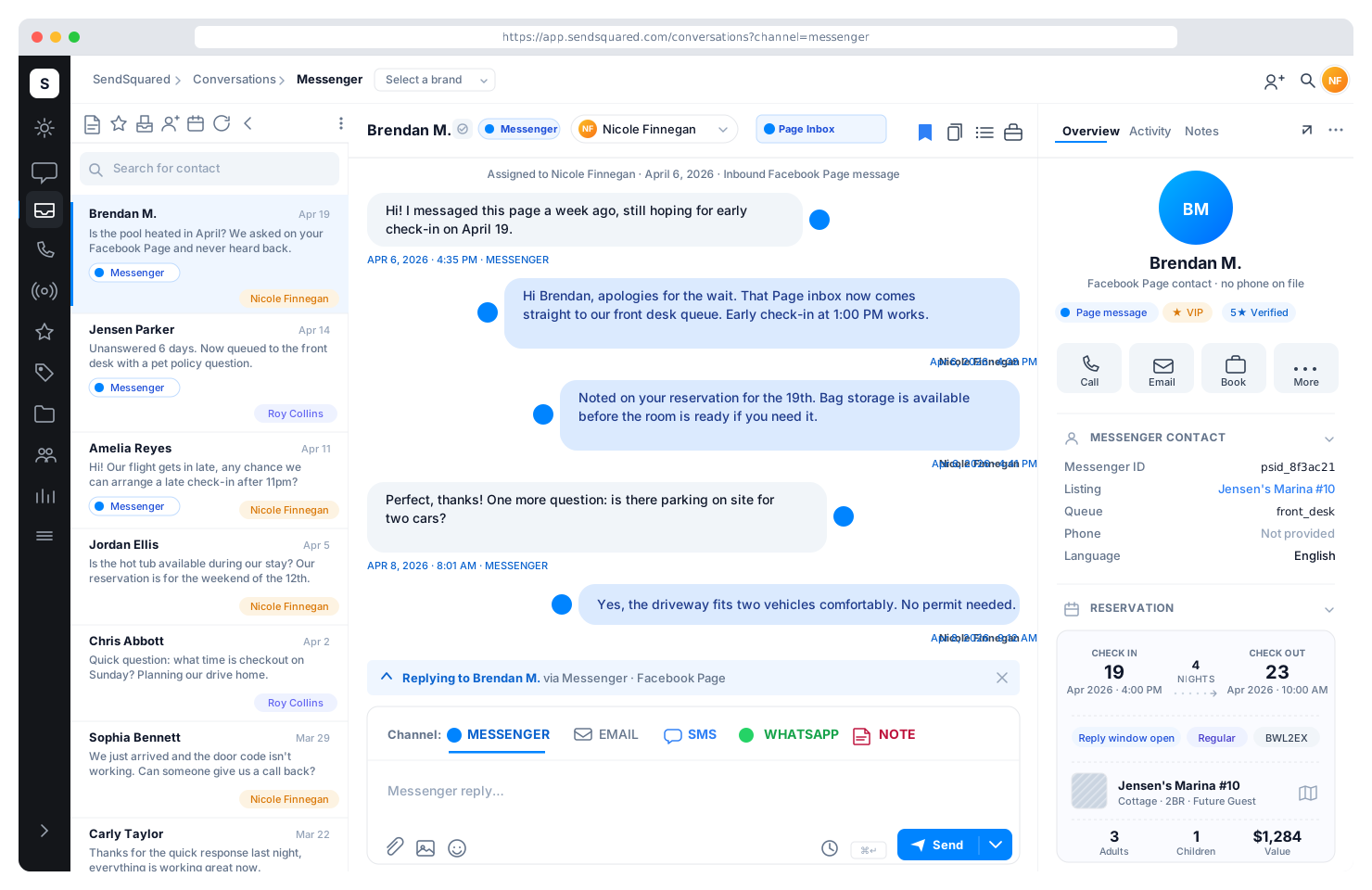
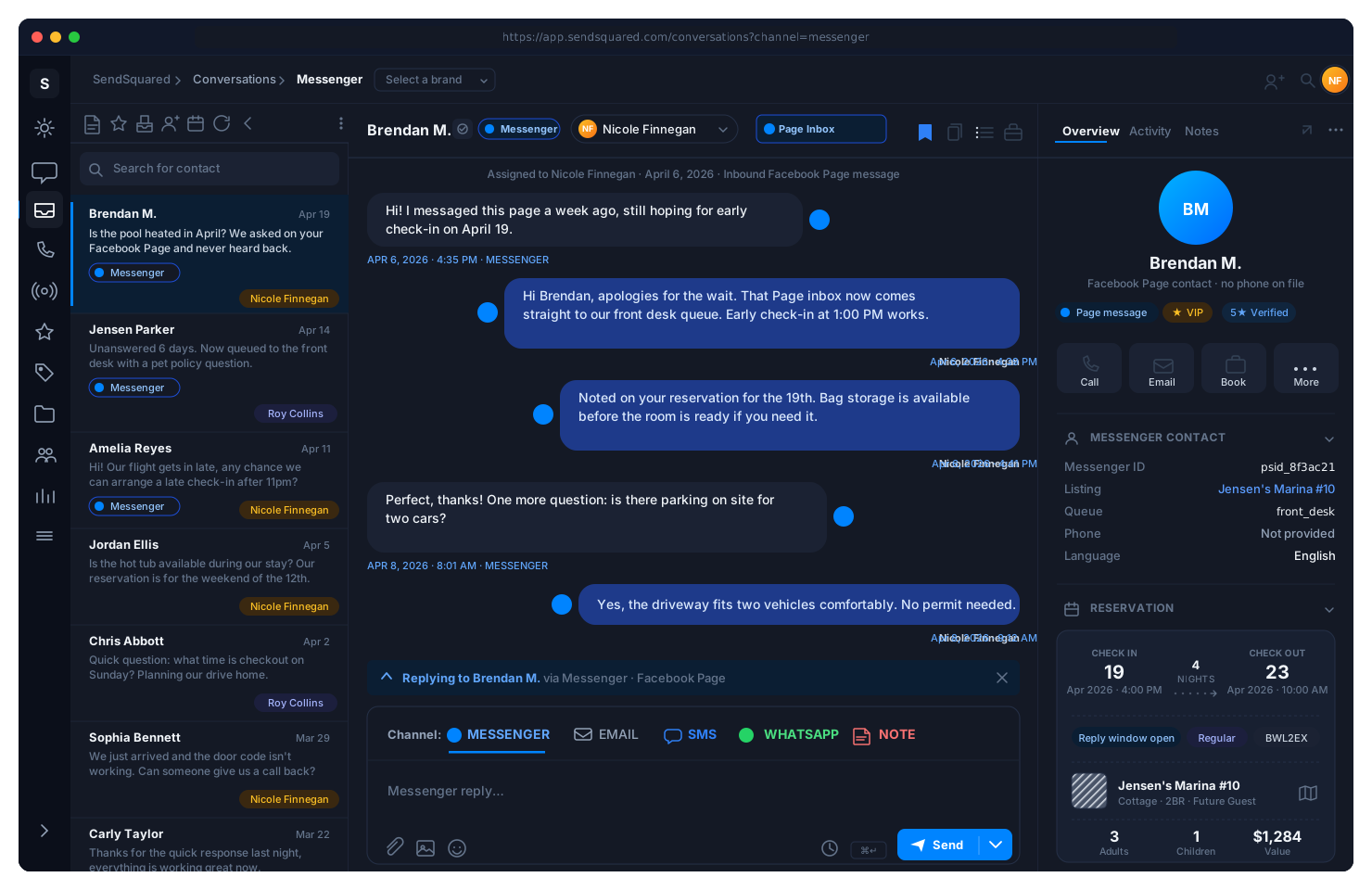
Facebook Messenger threads into the SendSquared unified inbox alongside SMS, WhatsApp, email, web chat, OTA messaging, and voice. Page messages reach a staffed queue instead of a login nobody uses, get matched to the PMS reservation when the guest is known, and become tracked leads when they are not.
6+
Channels In One Guest Inbox
1
Thread Per Guest, Not Per App
Real-Time
PMS Context On Matched Conversations
Almost every property we onboard has a Facebook Page with unread messages in it. Not a handful: months of them, asking about availability, pet policy, parking, and whether the pool is open in April. The Page is usually the oldest owned channel a property has, and it is almost always the least monitored. Connecting it to your inbox is the cheapest response-time win available to you, because the demand is already there and nobody is answering it.
The channel everybody forgot
Why the Page inbox goes unanswered for days.
This is not a discipline problem. It is a structural one. Every other guest channel at a property has an owner, a queue, and a manager who can see the backlog. The Facebook Page has none of those things, and the reasons repeat from property to property.
Nobody owns it
The Page was set up by a marketing hire, an agency, or an owner who has since moved on. Messages arrive to a login no current employee has. The front desk answers SMS in minutes and Messenger in days.
The notifications go nowhere
Page alerts land in one personal Facebook account, usually on a phone that is not on shift. There is no queue, no assignment, and no way for a manager to see what is waiting.
The questions are real bookings
Page messages skew toward availability, rates, pet policy, and group enquiries: the same questions your call center answers all day. They are inbound demand, not fan mail.
Facebook keeps score in public
Meta shows responsiveness on the Page itself. A Page that never replies tells every prospective guest who lands on it exactly how quickly this property answers.
The fix is not more discipline about checking Facebook. It is removing Facebook from the workflow entirely: the messages come to the inbox your team already lives in, and the Page stops being a separate place anyone has to remember.
Page Messages In The Inbox Your Team Already Watches
Messenger conversations arrive in the SendSquared unified inbox threaded by contact, next to SMS, email, WhatsApp, web chat, OTA messages, and voice. Agents reply from the same screen, with the same assignment, priority, and search behavior as every other channel. When the person is a known guest, their PMS reservation sits beside the conversation while your agent answers.
One Queue
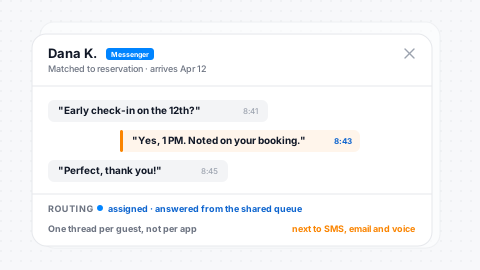
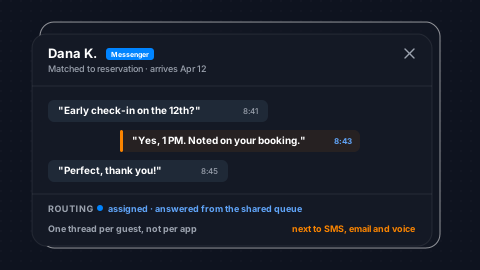
Page messages join the same queue as texts, emails, and calls, with no second app to check.
Threaded By Guest
A guest who messages the Page and later texts you is one thread, not two strangers.
Reservation Context
Matched conversations carry PMS reservation and CRM profile detail alongside the reply box.
No Shared Login
Agents answer through SendSquared permissions instead of passing around a Facebook password.
The Identity Problem, Told Straight
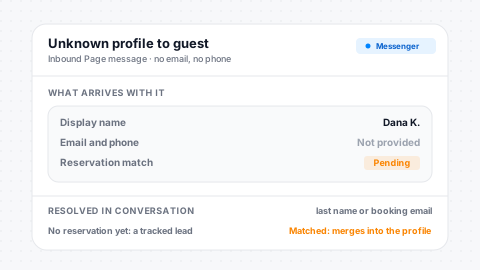
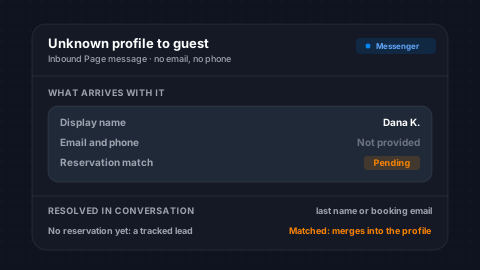
Messenger does not hand a business an email address or a phone number. It hands over a display name, and display names are nicknames, maiden names, married names, or the name of whoever in the household set up the account. Any vendor promising that Facebook profiles resolve cleanly to reservations is describing something that does not happen. What matters is what the inbox does when the match fails.
Contact On Arrival
Every inbound Page message opens a contact record so the thread is assignable immediately.
Resolved In Conversation
A last name, confirmation number, or booking email is what actually links the thread to a stay.
Unknown Becomes A Lead
No reservation behind it means a tracked lead with a source and an owner, not a dead end.
Merges Into The Profile
Once details match an existing guest, the Messenger history joins their CRM timeline.
From stranger to guest profile
How an unknown Facebook message becomes a booking you can track.
The message arrives as its own conversation
An inbound Page message becomes a conversation in the inbox the moment it lands, whether or not SendSquared can tell who sent it. Nothing waits on a match, because an unidentified guest asking about availability is still a guest asking about availability.
A contact is created from what Messenger gives you
Messenger hands over a display name and a profile, not an email address or a phone number. That is enough to open a contact record and hold the thread against it, so the conversation has somewhere to live and somebody to assign.
Your agent asks the question that resolves it
Real identity resolution happens in the conversation. Confirming a last name, a confirmation number, or the email the booking was made under is a normal thing to ask, and it is the step most Page inboxes never reach because nobody is reading them.
It becomes a lead, or it becomes a guest
With contact details captured, an enquiry with no reservation behind it becomes a tracked lead in the pipeline with a source, an owner, and follow-up. A message from someone already in your PMS merges into the existing guest profile, and the Messenger thread joins their history alongside every SMS, email, and call.
Lead source, owner, status rules, and follow-up all behave the way they do for a web form or a phone enquiry, because by this point it is the same kind of record in the same guest data platform.
Somebody Owns Every Page Message
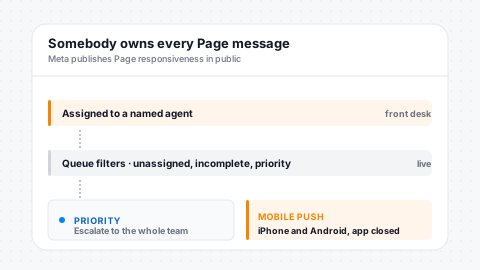
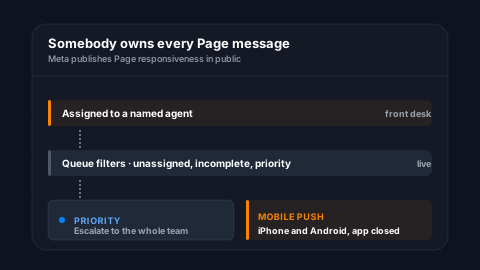
The reason Page messages rot is that they have no owner. Inside the inbox they get one. Conversations are assigned and reassigned under separate permissions, can auto-unassign back to the team queue when a new inbound lands, and surface through queue filters for unassigned, incomplete, and priority work. Push notifications reach iPhone and Android even when the app is closed, so the person on shift hears about it rather than the person who created the Page in 2014.
Assignment & Routing
Assign, reassign, and unassign are separately permissioned with a full audit trail.
Queue Visibility
Filter by assignee, unassigned, incomplete, or priority so no thread hides in the pile.
Mobile Push
Notifications land on iPhone and Android even with the app fully closed.
Priority Flags
Escalate an urgent Page message to the whole team instantly, on five priority levels.
Meta platform policy
Messenger is a reply channel, and that is a policy fact.
Meta's messaging policy governs when a business may start a conversation on Messenger, and it is deliberately restrictive. You are on solid ground answering someone who messaged your Page. You are not free to message people because they once did. Any tool that implies otherwise is either working around the policy or about to lose access to it, and your Page is the thing at risk.
Replies are the sanctioned use
Meta permits a business to answer a person who has messaged its Page. That is what this integration is built around: every inbound Page message reaches a staffed queue and gets a real answer.
Business-initiated messaging is restricted
Outside the response window that opens after a person's most recent message to your Page, Meta restricts what a business may send. The exceptions Meta allows are narrow, purpose-specific, and subject to its approval rather than yours.
We will not quote you an hour count
Meta revises the specifics of its messaging policy, and a number printed on a marketing page ages badly. The durable point survives every revision: Messenger is a channel you answer on, not a channel you broadcast from.
The campaign channels stay the campaign channels
Rate offers, gap-night pushes, and seasonal sends belong on email and SMS, where consent is explicit and the audience is yours. Messenger picks up the conversations those campaigns start.
Meta owns this policy and can change it. Treat the specifics as Meta's to publish, and check Meta's own platform policy documentation before you plan anything around the edges of it. The same logic applies on WhatsApp, where we wrote up what the messaging policy means for hotels.
Being honest about it
What Messenger is not good for.
A channel page that only lists upsides is not much use when you are deciding where to put your team's attention. Messenger earns its place because inbound Page messages are real demand going unanswered. It does not replace the channels you run campaigns on, and it should not be sold to you as if it does.
- Bulk promotional sends to everyone who has ever messaged the Page
- A newsletter or a rate-drop blast dressed up as a chat message
- Re-engaging a contact who went quiet months ago with an offer
- Your primary consent channel: an email address and a mobile number are still what you need to own the guest relationship
The practical sequence: answer the Messenger enquiry, capture an email address and a mobile number in the course of answering it, and from that point the guest is reachable on channels you control. Messenger is how a lot of guests start. It is rarely where the relationship should stay.
Find Out What Is Sitting In Your Page Inbox
We will look at your Facebook Page with you, show you how Messenger threads land next to SMS, email, and voice, and tell you honestly what the channel is worth for your property.
Where it fits
One more channel into the same guest record.
Messenger is not a separate product here, and it is not a separate inbox with a shared login. It is one more channel landing in the same place as everything else: SMS and email from your own numbers and domains, WhatsApp Business, Airbnb messaging and other OTA threads, web chat, web form submissions, and inbound calls answered by the AI voice agent.
That matters most on the second contact. A guest who asked about pet policy on Messenger in March and calls the property in June is one person with one history, not two unrelated strangers, and the agent who picks up the phone can see what was already promised. Whether you run a hotel CRM or a vacation rental CRM, the Page conversation is part of the record rather than an artifact stranded inside Facebook.
Frequently Asked Questions
Does SendSquared support Facebook Messenger?
Yes. Facebook Messenger is a supported inbound channel today. Messages sent to your Facebook Page thread into the SendSquared unified inbox alongside SMS, WhatsApp, email, web chat, OTA messaging, and voice, with the same assignment, priority, and search tools as every other channel.
Can I reply to Facebook messages from one inbox?
Yes, and that is the point of the integration. Your team answers Page messages from the same screen it answers texts and emails on, so nobody needs the Facebook login and nobody has to remember to check a second app. Replies go back to the guest inside Messenger.
Do Messenger conversations attach to the guest reservation?
When the person can be matched to a contact in your CRM, yes: the thread sits on their guest profile with PMS reservation context next to it, the same as a text or a call. When they cannot be matched yet, the conversation stands on its own until your agent captures enough detail to resolve it.
What if a Facebook profile name does not match any reservation?
That is the normal case, not the exception, because Messenger gives a business a display name rather than an email or phone number. The message still becomes a conversation, still gets assigned, and becomes a tracked lead in lead management once your agent captures contact details. If those details match an existing guest, the history merges onto that profile.
Can I send Facebook Messenger marketing campaigns?
No, and you should be wary of any vendor that says otherwise. Meta platform policy restricts business-initiated messaging outside the response window that follows a person's own most recent message to your Page, so Messenger works as a reply and service channel. Bulk marketing belongs on email and SMS where consent is explicit.
Will this improve my Page response rate badge?
Meta calculates Page responsiveness from how quickly and how consistently your Page answers, and it shows the result publicly. Routing Page messages into a staffed queue with assignment and mobile push is what moves that number. We do not control how Meta computes or displays it.
Can I assign Messenger conversations to specific team members?
Yes. Messenger threads use the same assignment and routing controls as the rest of the inbox: assign, reassign, and unassign are separately permissioned, conversations can auto-unassign back to the queue when a new inbound arrives, and the queue filters by assignee, unassigned, incomplete, or priority.
Can my team answer Facebook Page messages from a phone?
Yes. Inbox push notifications reach iPhone and Android even when the app is closed, so an inbound Page message reaches whoever is on shift rather than sitting in a browser tab nobody opened.
Do we still need to log into the Facebook Page inbox?
Not for day-to-day guest messaging. Conversations and replies run through SendSquared, which is what lets you retire the shared login and the one personal account that used to receive every Page notification. Page administration itself still lives with Meta.
Explore More
Part Of The Hotel Messaging Stack
Unified Inbox
Every channel threaded by guest with PMS reservation context
Hotel Messaging
Messenger plus SMS, WhatsApp, email, web chat, and AI voice in one inbox
Instagram DM
The other Meta inbox, under the same reply-window policy
Airbnb Messaging
Official messaging partner, threaded on the same guest record
WhatsApp Integration
Two-way WhatsApp Business messaging and approved templates
Lead Management
Where an unmatched Page enquiry becomes a tracked lead
Website Chat
Turn site visitors into persistent SMS conversations
Unified Inbox AI For Guest Communication
How one inbox changes hotel response times
Ready to Get Started?
See how SendSquared can transform your hospitality operations.
Schedule a Demo